


quote ai

Built for buyers (early access)
Turn every shipment file into declaration-ready data, line by line
Extract and compare supplier quotes, RFQ replies, price lists, delivery notes and pro-forma invoices in real time. One API for purchasing teams, procurement consultants, trading houses, distributors and ERP systems to build comparison sheets faster, catch mismatches before approval and reconcile quotes against final purchase orders.
Request a demo
Sample data only
Every quote line retyped by hand is a purchase at risk
Supplier quotes with hundreds of lines, price lists in every vendor's layout, RFQ replies scanned at an angle. Each line is keyed into the purchase order by hand, and one wrong unit, incoterm or price means a disputed order, a delayed delivery, or an overpayment for the buyer.

1
RFQ issued
The supplier sends the quote file
2
Upload quotes
Bottleneck
Quotes in every format: units, incoterms and prices retyped by hand.
3
Buyer review
Bottleneck
Quote files pile up before the deadline, lines retyped one by one.
4
Discrepancy
Cross-validation
Bottleneck
Unit price on the quote ≠ price on the purchase order. Back to step 02.
5
Order approved
If it clears the approval threshold
Every shipment document, reviewed in a single flow
klarank identifies each file automatically and pulls out the fields your team needs, so they can be cross-checked against the rest of the order.

Auto-sort documents

Supplier invoice
- Invoice reference
- Invoice issue date
- Payment due
- Supplier legal name
- Supplier postal address
- Supplier tax ID
- Supplier trade register no.
- Supplier bank account
- Buyer name
- Buyer delivery address
- Buyer tax ID
- PO and reference codes
- Quoted line items
- Subtotal excl. tax
- Tax lines (rate, base, value)
- Total tax charged
- Grand total
- Quote currency
- Payment schedule
- Document type (quote / credit note)
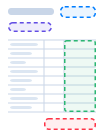
Delivery note
- Delivery note number
- Dispatch date
- Dispatching supplier
- Receiving buyer
- Items per carton (SKU, description, quantity)
- Total cartons
- PO / order number
- Carton numbers
- Packaging type
- Net mass
- Total gross weight
- Carton dimensions
- Total cubic volume
- Shipping marks and numbers
- Country of manufacture
- Container ID
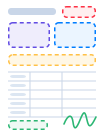
Shipping bill (B/L)
- B/L reference
- Dispatching supplier
- Receiving buyer
- Loading port
- Discharge port
- Container IDs
- Goods description
- Notify contact
- Freight carrier
- Ship name
- Voyage ref.
- Receipt location
- Delivery location
- Seal references
- Package count
- Gross mass
- Cubic volume
- Freight payment (prepaid / collect)
- Issued on
- Board loading date
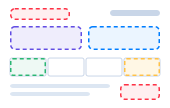
Air waybill
- AWB reference
- Dispatching supplier
- Receiving buyer
- Departure airport
- Arrival airport
- Flight number and date
- Piece count
- Gross load weight
- Carrier's issuing agent
- Route
- Billable weight
- Tariff class
- Goods nature and quantity
- Declared carriage value
- Declared customs value
- Fees (prepaid / collect)
- Handling notes
- Issuance date

Customs entry
- Entry reference (MRN)
- Entry type (import / export)
- Shipping party (export)
- Receiving party (import)
- Tariff codes (HS)
- Declared customs value
- Duties and levies
- Declarant / clearing agent
- Trader registration numbers
- Origin country
- Destination country
- Customs station
- Goods description
- Units
- Gross and net weight
- Pricing currency
- Delivery terms (Incoterms)
- Transport method
- Entry date
- Process code
From upload to a verified document flow, in five steps
How import paperwork moves through klarank: sort every attachment, pull out suppliers, Incoterms and each quote line, reconcile prices, quantities and weights across documents, then pass approved data to your purchasing system and send mismatches to a buyer for review.

Gather
New supplier email or shipping notice with attachments

klarank Classify
Quote, packing list, B/L, air waybill

klarank Extract
Item name, HS code, origin, unit price, weight…
CHECK
{Your approval rules to apply}
Reconcile

Clean data moves on automatically
Approval-ready data sent to your purchasing system

Exceptions to a buyer
Route to buyer review
Test in minutes, then roll out through the API
Run the full supplier quote flow as a no-code scenario first. Once your purchasing team is convinced, connect the same models to your procurement platform.
Step 1 : Test
Run a proof of concept in a no-code tool
No code, no IT ticket. Upload quotes and watch klarank read them.

Supplier inbox
Supplier quote, packing list, purchase order

klarank Extract & Rank
Line items, unit prices, incoterms, lead days

ERP system
One approvable sheet per RFQ. Ready to raise the PO.

Team chat
Alert on missing quote lines or mismatched units
Step 2 : Rollout
Connect the API to your purchasing platform and workflow
Same models, same ranking, wired into your whole procurement stack within a few days.
klarank docs
$ pip install klarank

Your supplier sources

klarank platform
Your ERP system
What each purchasing team gains
Procurement, finance and operations don't need the same thing from supplier quotes. Here is what each group gets from klarank.

3 teams · 1 workspace

Operations
· Sourcing leads, ERP admins
A clear integration path to your ERP, live in days, with no extra custom work

Reliable workflows that grow with your supplier base.
Little setup : current guides and connectors
No purchasing surprises : ongoing checks on every quote and price change

finance & supply
· CFOs, COOs, Procurement heads
Approve more RFQs per buyer and cut costly errors from manual re-keying
Lower spend, tighter controls, healthier margins
Smoother rollout thanks to ready-made quote templates
Data kept private : secure hosting with role-based access
purchasing
· Buyers, Category managers
Read each supplier quote at upload, so every purchase order carries complete line items
- Line-level data for every quote, ready for landed-cost comparison
- Missing units, incoterms or prices flagged before approval
- Unclear quotes routed to a buyer for review, never a dead end
Outcomes reported by purchasing teams, on average
Purchasing teams that compare supplier quotes with klarank spend less time keying in line items and approve orders faster. Here’s what changes once quote checks run automatically: less manual review, more RFQs handled by the same team, and a quick path from first trial to live use.
-X
%
less time spent on quote reviews
TIME PER QUOTE - Before/After klarank
X
k
supplier quotes ranked every month
Volume - past 6 months
Days
from first connection to live purchasing

Trial - connect - go live
Connect klarank to your purchasing workflow in minutes with APIs and no-code tools
Go live in minutes with our verified no-code connector, or link your ERP through our documented REST API built for developers. SDKs for Python, .NET, Node.js, Java, Ruby, PHP.
Connections
Enterprise-ready data protection
Our API runs on hardened infrastructure with strict access controls, keeping your supplier quotes and pricing data protected at all times.

Regional hosting options available

Privacy-focused data handling
Security overview
FAQ for this sourcing scenario
Still have a question? Our purchasing specialists reply within one business day.
About klarank
Which paperwork is required to clear imported goods?
Clearing imported goods usually calls for a commercial invoice (the goods bought, their agreed value and the parties involved), a packing list (the contents, weight and packaging of each carton or pallet), a transport document such as a bill of lading for sea freight or an air waybill for air freight, and often a certificate of origin to claim preferential duty rates. Depending on the goods, import licences or certificates may also apply. klarank automatically reads each of these files, even when they arrive together in a single bundle, and pulls their data into one structured shipment record, ready for the customs declaration.
Can klarank pull HS codes from supplier shipping documents?
An HS (Harmonized System) code is the international product classification customs uses to set duties and import rules. The first six digits are common worldwide, while each country appends its own extra digits. When HS codes appear on a commercial invoice or packing list, klarank captures them line by line, together with the description, quantity, value and country of origin of each item. Your buyers can then verify them, reuse them in the declaration, and catch lines where the code is missing or does not match the product description.
How long does customs clearance take, and how can it be quicker?
Clearance can take anywhere from a few hours to several days, depending on the destination, the goods and whether the consignment is picked for inspection. Many delays start with the paperwork itself: missing details, typing errors in the declaration, or mismatches between the invoice, the packing list and the bill of lading. With klarank, the data is captured in seconds instead of being re-keyed, and mismatches are flagged before the declaration is submitted, not after customs raises a query. This saves time on every shipment and lowers the risk of holds and fines.
Can klarank cross-check the invoice, packing list and bill of lading?
Yes. Since every document becomes structured data, you can compare them automatically: the package count and gross weight on the packing list against the bill of lading, the quantities and values on the invoice against the packing list, and the shipper, consignee and Incoterms across all three. Shipments where everything agrees move on to the declaration step, and only those with a discrepancy go to a customs agent, with the mismatched fields highlighted. Procurement and logistics teams can then process more shipments with the same headcount.



Ready to move your purchasing approvals without the manual chasing?
Pull and check supplier quotes, RFQ replies and delivery documents as they arrive. Run it on a batch of your own supplier files and see ranked results within minutes.
Enterprise-grade security & data protection
Sample data only